SNGPL Bill Check Online by Consumer Number | Duplicate Bill
Almost every citizen from Punjab, Islamabad, KPK, and Azad Kashmir receives a physical bill from the Sui Northern Gas Pipelines Limited for their gas consumption. But still, hundreds of users also visit the SNGPL portal to confirm the amount of their bill.
Besides that, sometimes people also use the portal when they have lost their bill in the mail, are renting a place, or have never received an original bill. People also use the online billing system to check their due date, meter reading, or download a duplicate copy. No matter for what reason you want your SNGPL bill checked online, you need an 11-digit consumer number. In some old bills, it is also printed as “Account ID” on older bills. If you are SSGC Consumer Check SSGC Bill.
Check SNGPL Bill Online by Consumer Number
SNGPL Bill Lookup
Enter your consumer number to view your gas bill
Please enter a valid consumer number (digits only).
Your bill was opened in a new tab. If nothing appeared, your browser may have blocked the pop-up — allow pop-ups for this site and try again.
In this guide, we will explore how to check Sui Gas bills online, steps to find your consumer number, download a duplicate bill, and more. So keep reading.
Easy Steps for SNGPL Bill Online Check
You only have to spare a few minutes to check your SNGPL bill online by using our tool. Before you start the bill check process, you must ensure that you have a consumer number or Account ID. You can also check it from your previous Sui Gas bill.
Follow these steps to find your latest bill:
- Find your 11-digit Consumer Number (Account ID) from your old SNGPL bill.
- Now, enter the consumer number into the bill check field.
- After that, open the official SNGPL billing portal.
- Complete the security CAPTCHA.
- The bill will load on your screen, so click on the View Bill button.
- Your latest bill of Sui Gas will appear on the screen.
- Download or print the SNGPL bill duplicate if needed.
Our website will retrieve the latest bill from the Sui Northern Gas database, which will include your current bill status, due date, and payment history.
How to Check Your SNGPL Bill on Mobile?
We designed our online bill checker device-friendly. That’s why you do not just need a computer to check your gas bill. You can easily open the official SNGPL website on smartphones and tablets.
From your Android or iOS smartphone, you must open your browser.
- Now, search for the Sui Gas bill check online.
- In the next step, enter your consumer number.
- Tap the button to open the official SNGPL bill portal.
- Complete the CAPTCHA verification.
- View your current gas bill.
- Save the bill as a PDF or share it if required.
When you are traveling and want to double-check your bill or get its duplicate, you can easily check your bill from a mobile device.
How to Find Your SNGPL Consumer Number (Account ID)?
For the latest bill inquiry, you need a consumer number, as without it, you cannot find any information related to your bill.
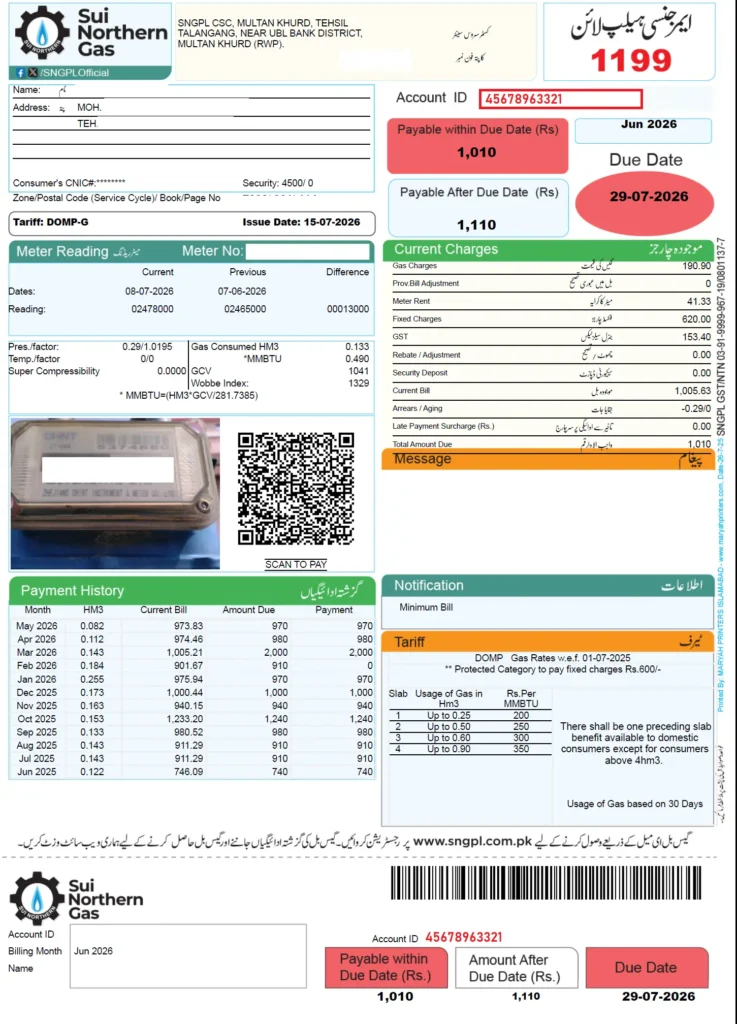
You can easily find it on your previous SNGPL bill near the customer detail section. It is usually printed on the top of the bill and also represented as an Account ID.
In addition, it is also printed on the payment slip at the bottom of the bill. If you don’t have an old bill, you can ask your landlord, a previous tenant, or a family member who paid the gas bill before. The previous bill will show the consumer number clearly.
Download SNGPL Duplicate Bill Online
If you have misplaced your bill or want a spare copy, then you can easily get a duplicate SNGPL bill copy.
Here are quick steps to obtain a copy of the bill:
- Once you open the bill, check and view the amount, due date, arrears, and meter reading.
- Next, select your browser print option.
- Select the save as PDF option to get a digital copy.
Now, you can use this digital copy to print a hard copy or email it to someone when you need it.
What Information Is Available on Your SNGPL Bill?
The SNGPL bill contains more information than just showing you the payable bill amount. To verify your charges and ensure you pay the correct amount, you must understand all these sections. It will also help to identify any unexpected increase in charges.
Here is a detail of what information you can find on the SNGPL bill:
Consumer Details
The consumer details will help you find your registered gas connection. These details include:
- Consumer Number (Account ID)
- Customer name
- Service address
- Tariff category
Billing Information
The billing information lets you know your consumed gas, previous balance, and other charges. This information includes:
- Bill month
- Issue date
- Due date
- Payable amount
- Current charges
- Previous balance
- Outstanding arrears
Meter Reading
With the help of meter reading, you can compare your gas consumption with the previous month. In this way, you will find your high gas consumption and manage it for next month.
The bill provide following meter reading details:
- Previous meter reading
- Current meter reading
- Units consumed
- Billing period
Charges and Taxes
With an understanding of the charges and taxes, you will know how your final bill amount is calculated.
- Gas consumption charges
- Fixed charges
- Meter rent (where applicable)
- Government taxes
- Billing adjustments
Details of SNGPL Bill Charges
The final amount of Sui Gas bill charges that you have to pay is not just the gas consumed fees. It contains various other components which add up to the bill.
Here are the total components on your SNGPL bill:
| Charge | Description |
|---|---|
| Gas Consumption Charges | Cost based on the amount of gas used during the billing period. |
| Fixed Charges | Monthly service charges that may apply regardless of consumption. |
| Previous Balance | Any unpaid amount carried forward from earlier bills. |
| Arrears | Outstanding dues added to the current bill. |
| Taxes & Government Levies | Charges imposed according to applicable government regulations. |
| Billing Adjustments | Corrections or revisions from previous billing periods, if applicable. |
What is the Difference Between Protected vs Non-Protected Consumers?
SNGPL classifies domestic consumers into two categories, which are protected and non-protected. It is basically based on gas consumption. Protected consumers are households that use a smaller amount of gas each month. They pay lower gas rates because they receive a government subsidy. In addition, they have a lower gas tariff, so they pay a lower bill. Non-protected consumers use more gas than the allowed limit. They have heigh tariff, so they have to pay higher charges.
However, you cannot choose your category yourself. SNGPL decides it according to the gas you consume. The categories change from one billing cycle to another, especially during the winter when gas consumption increases. You can manage costs more effectively by checking the consumption regularly.
How to Pay Your SNGPL Bill Online?
After you know your bill, you can pay your SNGPL bill online using any one of the supported payment methods. Some common options include mobile banking apps, payment wallets, such as EasyPaisa and JazzCash, and authorized payment collection centers.
Here are the steps to pay the bill using the myABL Mobile App:
- You should open the app and click on the payment icon.
- Now select the “new Payment” option and then click on “utility”
- Next, Write “SNGPL Sui Southern Gas Company” in Biller’s Name.
- Enter the 11-digit consumer number from your previous bills.
- Enter the amount and click on the payment button.
Why Your Sui Gas Bill is Higher Than Expectation?
The height bill than usual does not indicate that your bill has any error. There are several factors that usually increase monthly bill changes. These include:
- Higher usage in winter
- Change from protected to non-protected due to more usage
- Remaining previous balance
- More family members or additional appliances can raise consumption.
- Gas leakage can also increase the bill.
- Adjust previous readings or charges.
- Incorrect meter reading.
Reasons for Your Sui Gas Bill Not Showing
Sometimes, users complaint that their bill isn’t loading. However, this is not a permanent issue; with just a few simple fixes, you can see your results online.
Here are a few reasons and solutions for Sui Gas bill not showing:
Incorrect Consumer Number
Even a single wrong digit in your 11-digit consumer number can affect the process. That’s why you must ensure that your number is correct using an old bill.
Bill Not Generated Yet
The new bills are uploaded following the billing cycle of SNGPL. You can try checking your bill after a couple of days if you see a message of bill not generated yet.
CAPTCHA Verification Failed
You must reload the page and try verifying the CAPTCHA again if the CAPTCHA verification fails. The internet speed may also be responsible for the problem.
The Official Portal is Busy
However, SNGPL does not have a fixed calendar for issuing the bill for consumers. The meter reading and billing are divided into continuously rotating cycles throughout the month according to your zone or batch route, so when the bill is issued, the portal experiences heavy traffic. The traffic increases especially near the due date, which is 15 days after the issue of the bill. So, you must try bill checking during the non-peak hours and near the date of issue.
Comparison of SNGPL and SSGC
Here is a quick comparison between the SNGPL and SSGC gas companies in Pakistan.
| Feature | SNGPL | SSGC |
| Full Name | Sui Northern Gas Pipelines Limited | Sui Southern Gas Company |
| Coverage | Punjab, Khyber Pakhtunkhwa & Azad Kashmir | Sindh & Balochistan |
| Online Bill Check | Available | Available |
| Duplicate Bill Download | Yes | Yes |
| New Connection Services | Yes | Yes |
| Consumer Number Required | Yes | Yes |
How to Get New SNGPL Connection and Apply Online?
You can apply for the Sui Northern gas new connection online from the SNGPL online application portal. Or, you can also use the SNGPL ConnectOn App.
Here are the complete steps to apply for the new connection:
- Visit the SNGPL website or open the mobile app.
- Choose the option to apply for a new domestic gas or RLNG connection.
- Enter your details, which include your full name, father’s or husband’s name, CNIC number, CNIC issue date, and mobile number.
- Provide the complete address where you want to get the new gas connection.
- Now, upload the required documents, such as your CNIC copy, property ownership or tenancy documents, and a nearby gas consumer number if needed.
- Submit your application and save the tracking number so you can check your application status later.
Why Should You Choose Our Site for Bill Check?
Almost every Pakistani chooses our site to check their bill online. This is because our main goal is to keep the bill checking process easy and simple for everyone. These are the reasons that make us unique from others:
- We provide the latest and up-to-date information on Northern Sui Gas bills, so that you don’t have to navigate different websites.
- We provide direct access to the SNGPL billing portal.
- This site is flexible to use. You can use it easily on mobile devices, tablets, and PCs.
- We also provide guides for duplicate bills, new connections, and billing support.
Detail of SNGPL Helpline & Complaint Numbers
For any emergency or inquiry, you can contact the SNGPL helpline by using any of the following contact details.
Contact Numbers
- Emergency Contact Number: 1199 (Available 24/7 for gas leakages, low pressure, or outages).
- Head Office (Lahore): +92-42-99082000, +92-42-99082006, or +92-42-99080000.
- Corporate Affairs: 042-99083732
Email Support
- Billing Complaints: billing@sngpl.com.pk
- General Customer Services: customerservices@sngpl.com.pk
You can also visit your nearest SNGPL customer service center to resolve issues related to meter reading or a new connection.
Conclusion
You can know about your recent monthly gas charges quickly with the help of SNGPL consumer bill online. To access your bill details, you have to enter your 11-digit Consumer Number in the required field.
When you regularly review your bill, it will also help you monitor gas consumption, identify unexpected increases, and avoid late payment charges. So, for an accurate and quick bill check, you should visit our site.
FAQs
Can I check my SNGPL bill without the Consumer Number?
No, you must have your 11-digit consumer number with you if you want to view your Sui Gass bill anytime in front of the browser.
Is the Consumer Number the same as the Account ID on an SNGPL bill?
Yes! Both the consumer number and Account ID refer to the same numbers which are assigned to your gas connection.
Can I download my SNGPL duplicate bill as a PDF?
Yes. You can easily download your SNGPL duplicate bill as a PDF after opening it on the official portal. Then choose the browser print option and save it.
Can I check my friends’ Sui Gas bill online?
Of course! If you have their correct 11-digit Consumer Number or Account ID then you can view the corresponding Sui Gas bill online.
What will happen if I miss the SNGPL due date to pay the bill?
If you pay the bill after the due date, late payment charges may apply, and the outstanding amount can appear as arrears on your next bill.